Managing Products
Core FeatureThe Products page is control center for managing all fulfillable products.
Product Management Actions
Sync & Update Price:
Fetch latest pricing from Profill and update POD products
- Automatically compares current prices with Profill's latest pricing
- Generates CSV report of price changes
- Emails report to your shop's email address
- Get Instant Report: Request immediate price sync report via email
Import Products:
Bulk configure products via CSV file upload
Add Product:
Configure new Bigcommerce products for Profill fulfillment
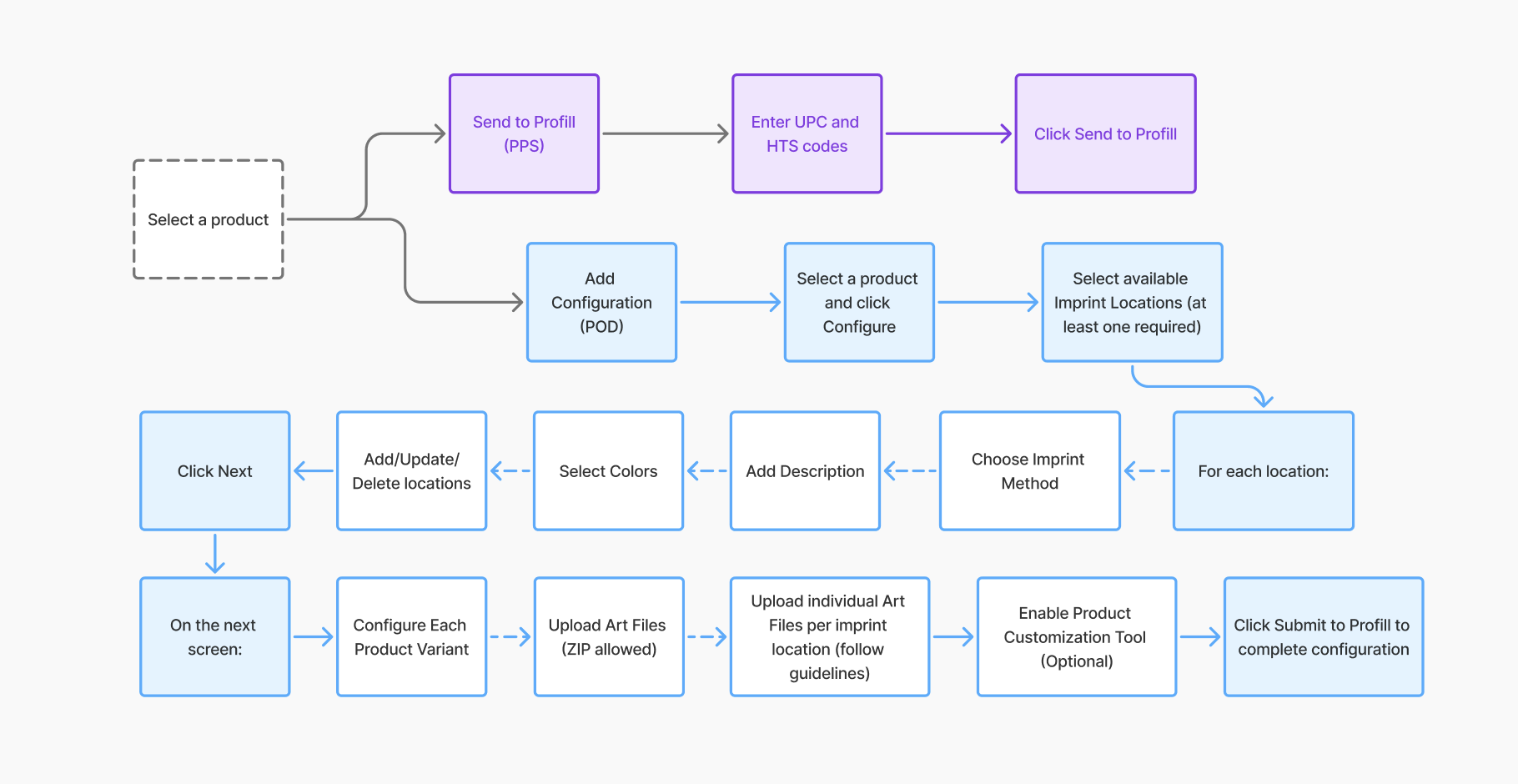
Product Configuration Process
-
Product Selection & Validation
- Click on Add Product to navigate to "Store Product List"
- Use search & filters to find specific products
- Click Configure (settings icon) on desired product
-
System Validates Requirements:
- Required Product must have a "Color" option
- Required Each variant must have unique SKU (3-15 characters)
- Required Each variant must have weight greater than 0
-
Configuration Type Selection
- Send to Profill → PPS (Pick Pack Ship) products
- Add Configuration → POD (Print On Demand) products